Dividing care works when each real task has one clear owner. "We all help with appointments" sounds cooperative, but it does not tell you who is calling the clinic Monday, who is driving Tuesday, or who is writing down what changed afterward.
Start with honest communication
Family caregiving becomes difficult when everyone assumes someone else is handling the details, or when one person quietly becomes responsible for remembering everything. Appointments, rides, medication pickups, paperwork, phone calls, meals, and emotional support can add up quickly.
Even families with several willing helpers can feel overwhelmed when responsibilities are unclear. A simple system for assigning caregiving tasks can reduce that confusion. Instead of relying on memory, group texts, or last-minute requests, families can make the work visible, decide who owns each next step, and adjust responsibilities as schedules change. The goal is not to divide every task perfectly evenly. It is to create enough clarity that everyone knows what needs to happen and who is responsible for making it happen.
Use a regular check-in to look at the next stretch of work. It can be ten minutes on Sunday evening. The point is not a family meeting for its own sake. The point is to put the coming jobs on the table while there is still time to assign them.
Keep the questions concrete. Who can drive Tuesday? Who can call the insurance office before Friday? Who is bringing dinner after the appointment? What is still unclaimed?
Between check-ins, put updates in one shared place so the family does not have to reconstruct the plan from old calls and texts.
Good communication ends with a next action someone owns.
Assign roles, not vague intentions
Turn broad responsibilities into small, visible actions. "Manage appointments" is too large. "Confirm Tuesday's appointment by Monday afternoon" is specific enough for one person to own.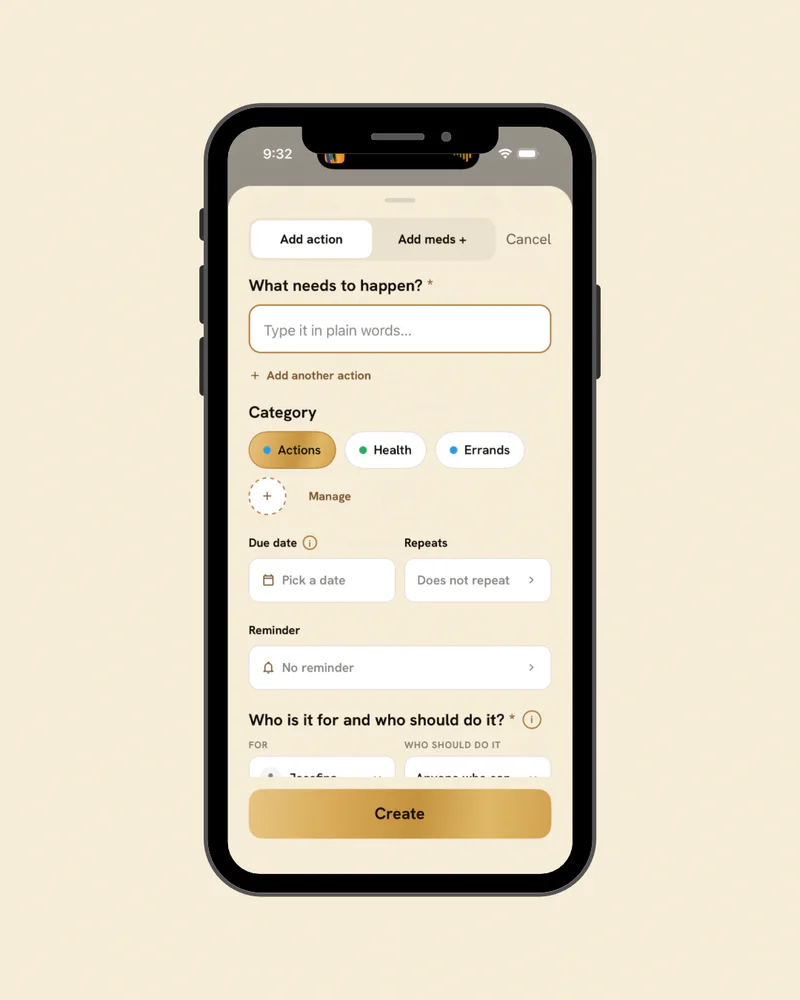
Give each action one owner. Other people can help, but one name should answer the question "Who is carrying this?" Add a date when timing matters.
If the family also wants to name larger roles, keep them practical. One person may be the main clinic contact. Another may manage rides. Another may keep the current documents organized. Those roles should clarify handoffs, not create titles for their own sake.
A responsibility becomes shareable when you can point to the exact next move.
When roles conflict
Suppose Maya agreed to drive Tuesday, but her work schedule changes. The useful conversation is not "You never help." It is "Tuesday's ride is uncovered now. Who can take it?"
If the same mismatch repeats, change the assignment. A task that conflicts with someone's actual schedule should move rather than becoming a weekly argument.
For bigger decisions, know the difference between a family role and legal authority. The person coordinating rides does not automatically have authority over medical or financial decisions. When authority depends on a document or professional guidance, check that source directly.
Solve the task first; do not turn every miss into a verdict on the person.
Don't forget the parts that aren't hands-on care
Care includes work that is easy to leave unnamed. A standing Sunday call with Dad. Updating the emergency contact sheet. Finding the signed power of attorney. Checking whether the primary caregiver needs someone else to cover Saturday morning.

Put those on the same visible plan when they matter. The task may be emotional, administrative, or practical, but it still benefits from an owner and a date.
The invisible work becomes easier to share once it is no longer invisible.
Coach can also help reduce the mental load that comes with turning information into action. When a family receives a new care instruction, appointment update, or unfamiliar medical term, Coach can help explain the information in plain language and make the next step easier to identify. Instead of one person having to interpret everything and then repeat it to the rest of the family, the team has a shared starting point for understanding what needs attention. Coach can also help turn guidance into clear actions that can be assigned inside HomeTeams, such as calling a provider, picking up a prescription, preparing for an appointment, or following up on paperwork. That keeps information from getting stuck with one person and helps the family move from “someone should handle this” to a specific next step with an owner and a clear due date.
Use one place to hold the handoffs
You can create and assign actions in HomeTeams, choose who does each one, set a date or leave it open, and message one person or a group when the handoff needs discussion. The app also supports teammate-specific access to notes and documents.
If your family wants one shared place for those handoffs, start at hometeams.io.